

Why Does Your GA4 Misreport ROAS from Ads? 6 Critical E-commerce Tracking Configuration Errors
The media agency reports an 800% ROAS, Google Ads reports hundreds of conversions, and the company account has no cash to cover current invoices. This is a common attribution illusion in e-commerce. See how standard implementations lose data and how to secure analytics properly.
Most store owners and e-commerce directors treat Google Analytics 4 as a maintenance-free visit counter. In reality, GA4 installed with the default WooCommerce, PrestaShop or Magento plugin produces distorted data in 9 out of 10 stores.
“If you feed Smart Bidding and Performance Max algorithms with falsified conversion data, the AI will optimise your budgets for random traffic instead of real net profit.”
— the PUSH data-cleanliness principleHere are 6 critical points in tracking architecture through which ad campaigns lose attribution and management makes wrong budget decisions.
Payment gateways and banks stealing credit from paid campaigns
A user clicks a Google Ads or Meta Ads ad, adds a product to the cart and goes to checkout. They choose payment by instant transfer or an external gateway. They are redirected to a banking domain and, once the transaction is approved, return to the thank-you page. At that point a default GA4 setup closes the previous session and opens a new one – attributing 100% of the order value to the bank or payment gateway as the source
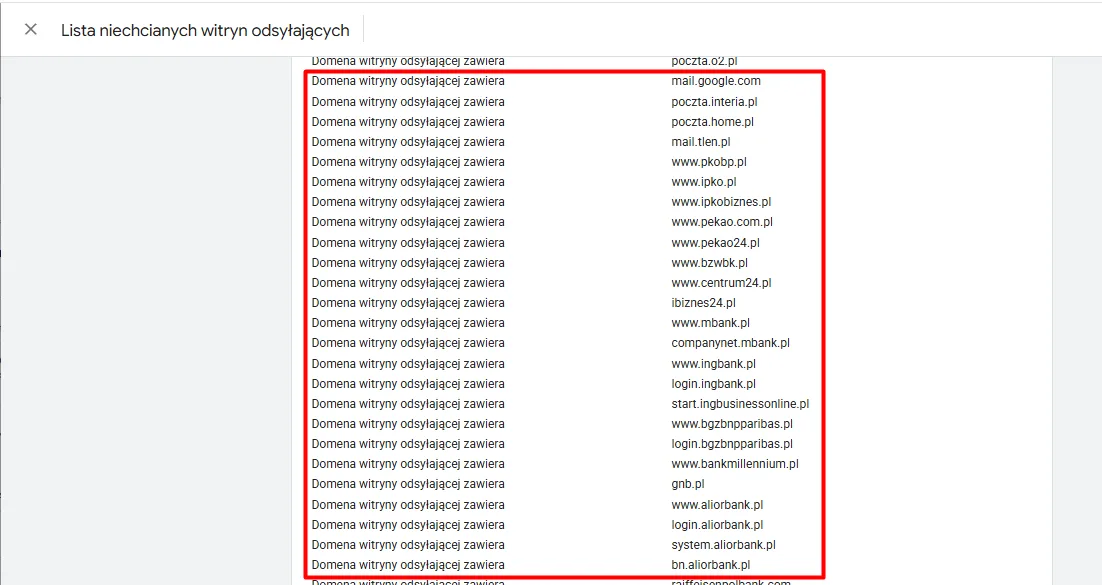
- A hard exclusion list (unwanted referrals): Configuring rules that exclude payment gateway domains (PayU, Autopay, Przelewy24, Tpay, BLIK) directly in the web data stream.
- Bank domain protection: Excluding the login domains of Poland’s largest banks (mBank, PKO BP, Santander, ING, Alior, Pekao), which take over customer sessions after 3D Secure authorisation.
- Session continuity: Preserving the original traffic source (cpc / organic) and feeding Google Ads data-driven attribution correctly.
Algorithms blind to users who reject cookies
Since March 2024 Google strictly requires Consent Mode v2 – otherwise remarketing lists are blocked and Smart Bidding algorithms degrade. A basic mode implementation cuts all tags until consent is clicked, losing 30–45% of data. Even worse are race conditions, where a tag fires before the CMP banner declares default states.
- Support for the new v2 parameters: Correct parameter initialisation
ad_user_dataandad_personalizationobok klasycznychad_storageandanalytics_storage. - Advanced consent mode: Allowing cookieless, anonymised pings that let Google’s machine learning model conversions.
- Order of calls in the code: The consent script must declare the default state at the very top of the
<head>, before the GTM container.
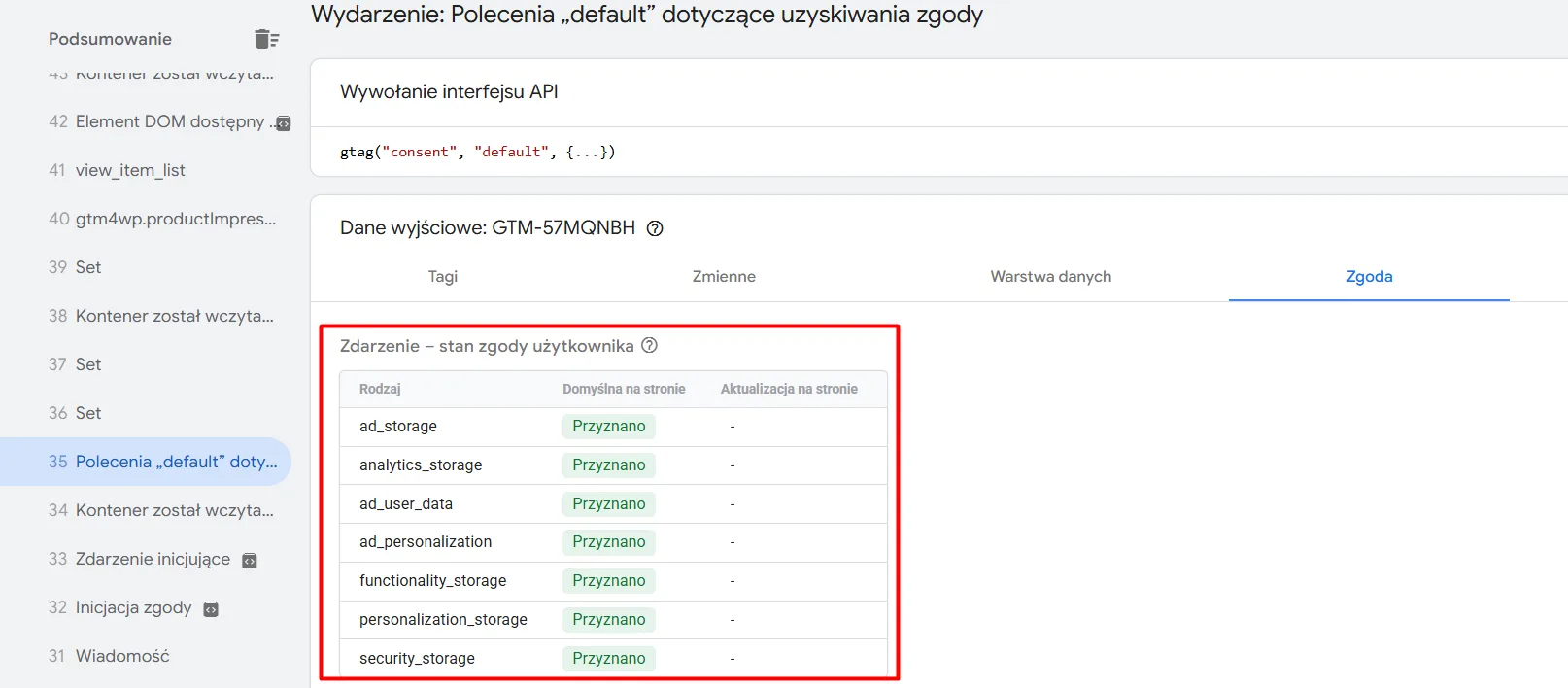
ad_user_data and ad_personalization) in the default state.
Phantom revenue: refreshing the order confirmation page
A customer pays for an order, lands on the thank-you page, then refreshes it on their phone, comes back hours later or clicks the link in the order status email. If the purchase event has no deduplication mechanism, it sends a GA4 event every time purchase with the same amount, inflating reported revenue by 15–25% above the ERP figure.
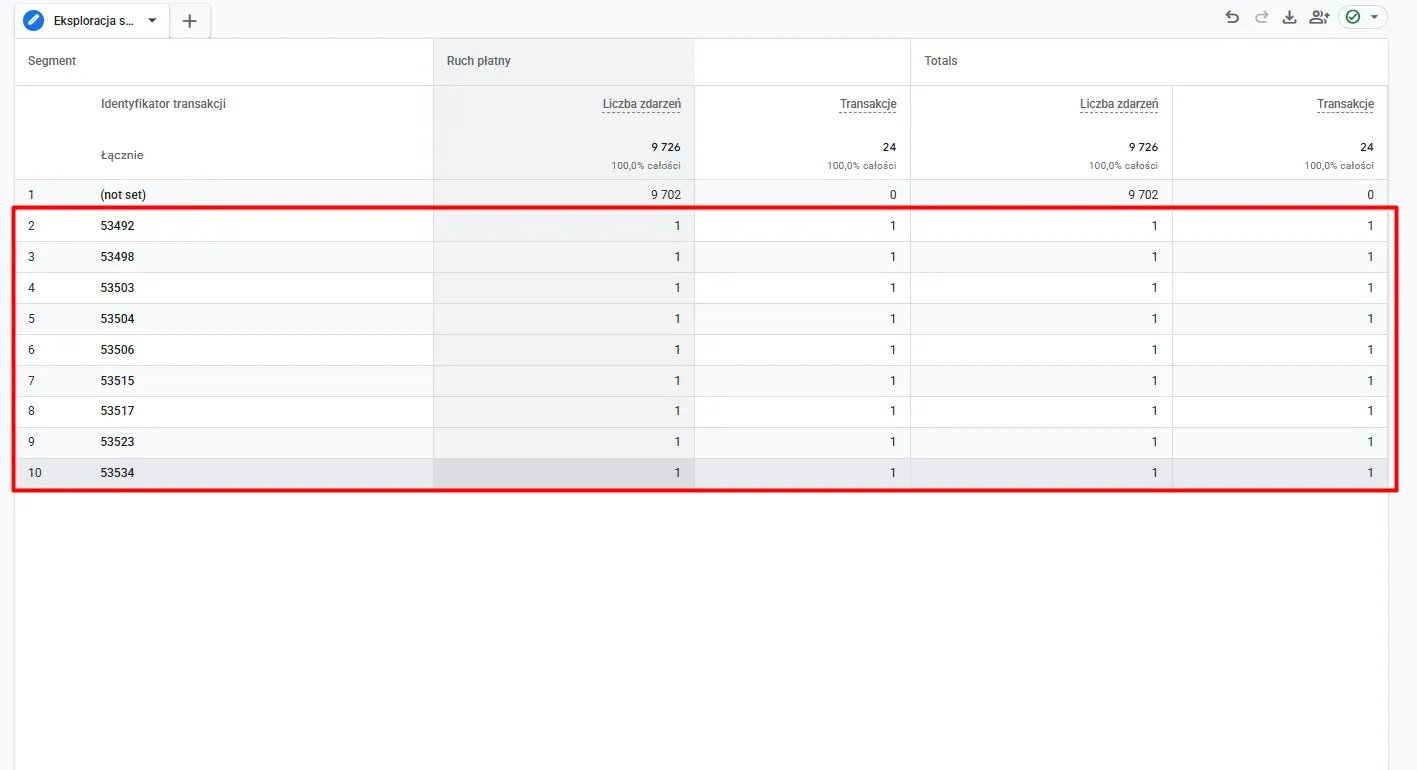
- Unique transaction_id: Every order must have a unique identifier tied to the number in the store database.
- Validation in GA4: Checking the metric relationship
Event count doTransactions in free-form exploration reports — the pattern must be exactly 1:1. - Blocking via SessionStorage / cookies: A browser- or server-side script marks processed IDs and prevents the tag from firing again on subsequent visits to the thank-you page.
Server-side tracking (sGTM): protection from Safari restrictions and browser blockers
Tracking based solely on JavaScript in the customer’s browser (client-side) is defenceless against ad blockers (AdBlock, uBlock) and Apple Safari ITP, which drastically shortens cookie lifetimes. As a result, a customer who buys 3 days after clicking an ad on an iPhone is recorded as direct traffic, and the campaign loses the ROAS it earned.
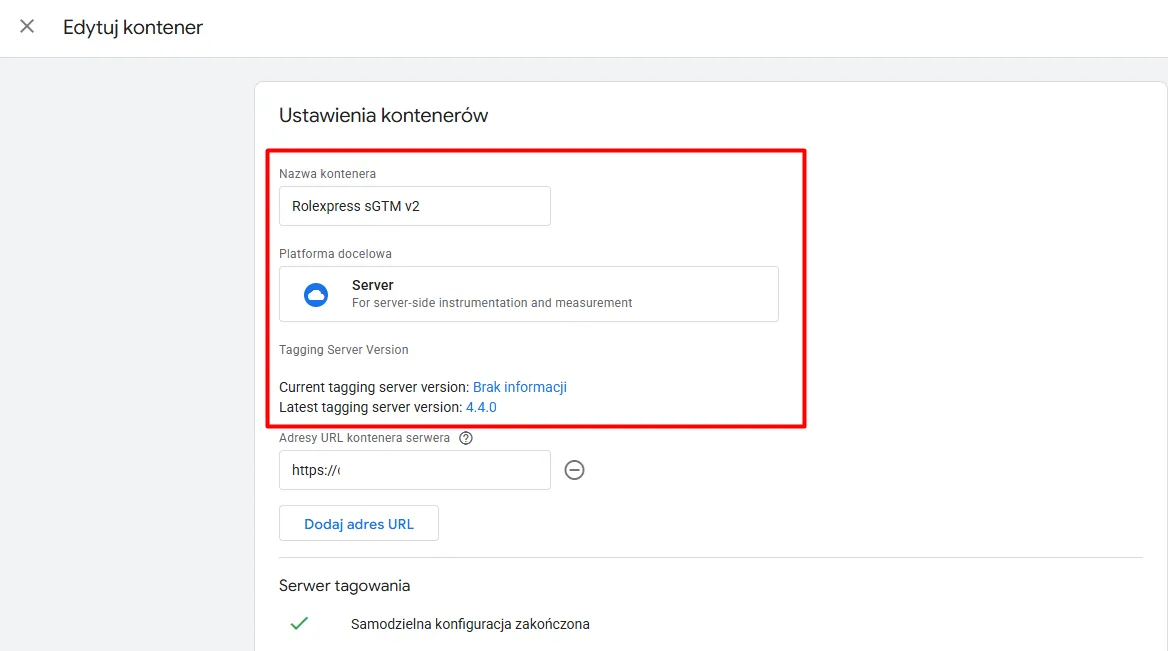
- Dedicated server-side GTM container: A server environment brokering data between the store and Google and Meta servers.
- Own first-party subdomain: Configuring the endpoint on your own domain (e.g. data.yourstore.com), which bypasses filters blocking third-party domains.
- Extended cookie retention: Keeping session and attribution identifiers on iOS devices for weeks rather than hours.
Data layer: parameter standardisation and value separation
When a store’s data layer is implemented carelessly, the purchase often sends GA4 gross values that include the delivery cost, while Google Ads calculates costs on net values. That mismatch means an artificially inflated margin on a single order obscures the real profitability of media spend.
- JSON structure compliant with the GA4 standard: Precise declaration of the purchase event object, split into customer and transaction parameters.
- Preparing for hashing: Safe transfer of contact data (e.g.
customerBillingEmailHash) for enhanced conversions. - Currency and tax consistency: Strict separation of the net goods value from taxes and shipping in analytics parameters.
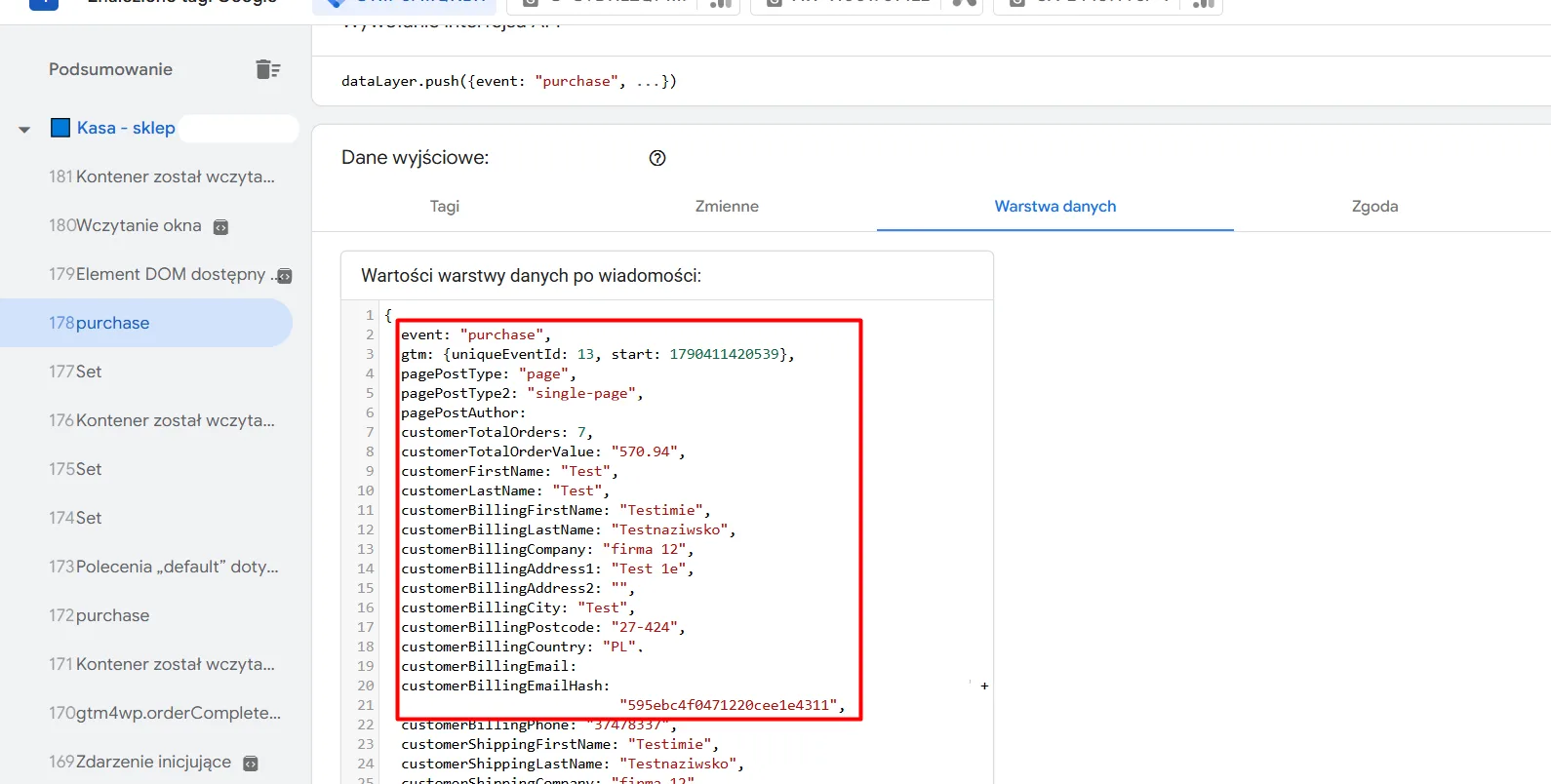
purchase on the checkout page. The red frame highlights the clean structure of transaction parameters and hashed user data prepared to feed the ad algorithms.
Enhanced conversions in Google Ads: closing cross-device attribution
As third-party cookies fade, the standard Google Ads pixel can no longer connect a user who clicked an ad on a phone with a purchase completed later on a laptop. Without Enhanced Conversions, sales in the Google Ads panel are permanently under-reported by 8–15%, artificially lowering the calculated ROAS.
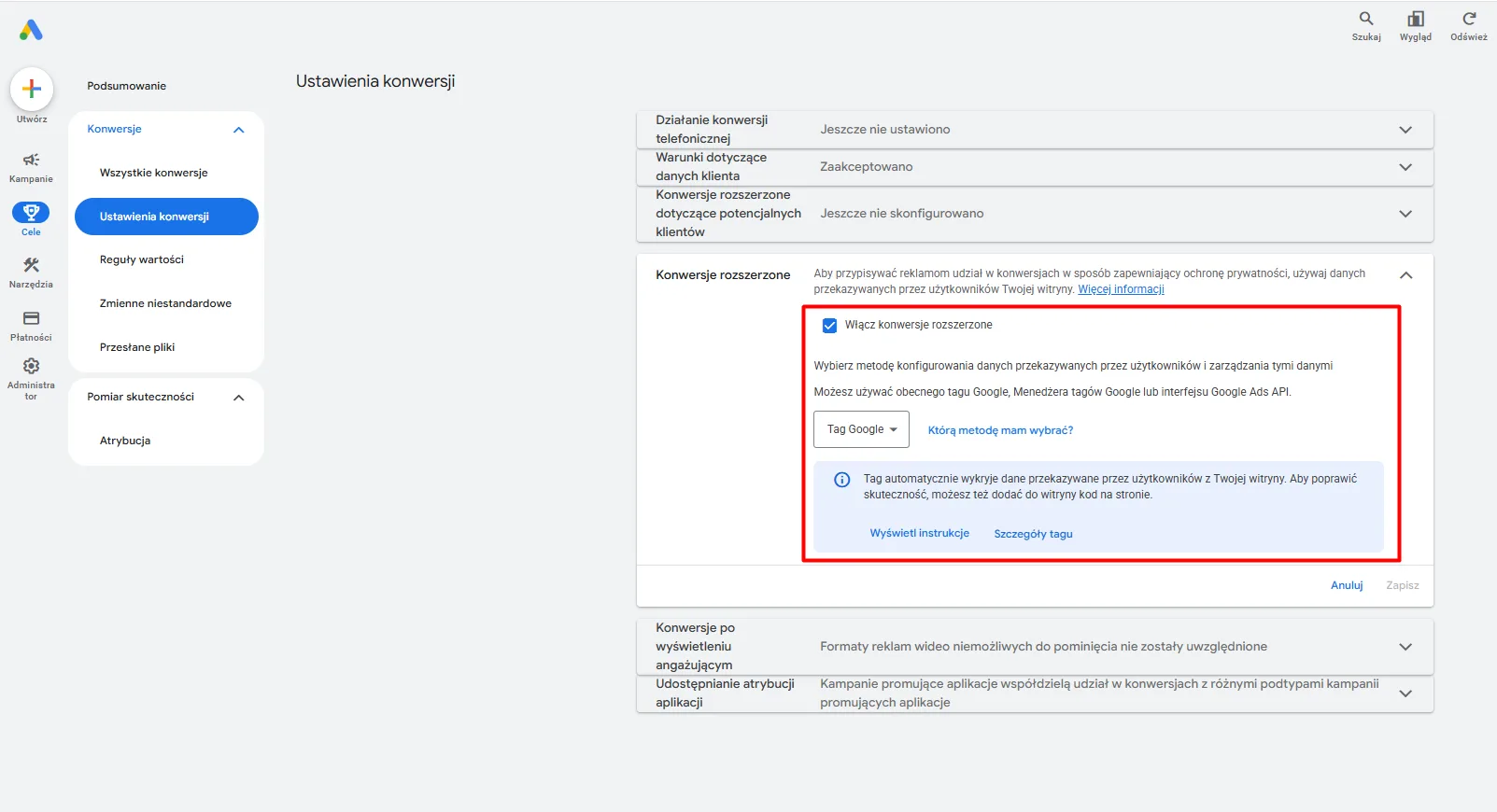
- Activating enhanced conversions in the panel: Formal activation of the module with acceptance of the customer data processing terms.
- One-way SHA-256 hashing: Secure encryption of email addresses and phone numbers before sending them to Google servers.
- Closing multi-device paths: Feeding Smart Bidding algorithms with complete data about returning customers.
Contact
Request a free audit of your store.
Fill in the form. Dawid, Lead Architect at PUSH, will analyse your store and get back to you within 24 hours with an actionable plan.

“Instead of hunting for random freelancers for every fix, we handed them full control over technology and campaigns. The store finally runs without issues, our customer acquisition costs dropped drastically, and we can focus solely on logistics and order fulfilment.”
Martyna – Co-owner, Rolexpress.pl