

GA4 + GTM + Data Layer in E-commerce: Complete Funnel and Micro-Conversion Tracking Plan
Without reliable measurement, CRO turns into guesswork and Google Ads or Meta Ads algorithms optimise on corrupted signals. Instead of stacking random “one-click GA4” plugins, you need one clean tracking plan: 12 Data Layer events, properly ordered GTM and Consent Mode v2, and a repeatable verification routine. Here is the complete blueprint alongside five real tracking defects we catch in audits.
Store owners often tell us: “GA4 is installed, the plugin tracks everything automatically.” Then we open Tag Assistant and browser DevTools Network tab and discover either zero GA4 hits firing at all, one page view firing four times, purchase events missing items or mixing VAT rules, or ad tags firing before the Consent Mode v2 default state.
In an earlier guide we covered 6 tracking errors that distort ROAS in GA4. This playbook goes one step further: a complete Measurement Plan for e-commerce - the 12 Data Layer events (including search, filter and variant micro-conversions), five live audit measurements showing what breaks in production, and a 30-minute QA checklist.
“Do not track 60 random events that nobody ever opens. Track 12 clean, consistent funnel and micro-conversion events where every single one answers a real commercial or CRO question.”
- PUSH GA4 / GTM Implementation StandardWant to test your current setup while reading? Open our free GA4 configuration auditor in another tab.
12 Data Layer events that actually guide CRO decisions (implementation table)
Default GA4 e-commerce tracking only covers core steps from product page to checkout. For practical CRO, it leaves a blind spot at the top of the funnel: which filters buyers use, what they search for (and when they hit zero results), and whether they interact with variants before hitting “Add to cart”.
| Stage / event | Trigger | Key parameters | CRO decision unlocked |
|---|---|---|---|
1. view_item_list | Category grid or search results rendered | item_list_name, items[] | Which categories attract traffic but fail to drive clicks. |
2. view_search_results | Site search results displayed | search_term, results_count | Missing catalogue items and zero-result queries. |
3. filter_apply (custom) | Filter or sort control applied | filter_name, filter_value | Which facets convert vs which clutter the sidebar. |
4. select_item | Product tile clicked on a listing | item_list_name, index, items[0] | Listing tile CTR by position and category. |
5. view_item | Product detail page (PDP) viewed | currency, value, items[0] | Baseline for PDP-to-cart rate per SKU/category. |
6. select_variant (custom) | Size, colour or trim option clicked | variant_type, variant_value, in_stock | How often buyers click out-of-stock sizes. |
7. add_to_cart | Item confirmed added to cart (post-validation) | currency, value, items[] | Buy-box and PDP persuasion effectiveness. |
8. view_cart | Cart page or slide-out drawer opened | currency, value, items[] | How many shoppers use cart as a shipping calculator. |
9. begin_checkout | First checkout screen loaded | currency, value, coupon, items[] | Cart-to-checkout drop (login wall, surprise costs). |
10. add_shipping_info | Delivery method selected and step submitted | shipping_tier, value, items[] | Locker vs courier split and address validation friction. |
11. add_payment_info | Payment method selected before placing order | payment_type, value, items[] | Express wallet share and payment gateway drop-off. |
12. purchase | Confirmed order (strictly deduplicated) | transaction_id, value, tax, shipping, items[] | True revenue and ROAS aligned with Ads platforms. |
One non-negotiable engineering rule: before every new e-commerce push to window.dataLayer, clear the previous object with dataLayer.push({ ecommerce: null });. Skipping this causes GTM to merge stale product arrays from earlier events and inflate cart values.
- Inconsistent
valuedefinition: agree once across teams whethervalueinpurchaseequals gross item revenue excluding shipping, and keep that rule identical across GA4, Google Ads and Meta CAPI. - Firing
add_to_carton button click instead of server/cart success: if a buyer clicks “Add to cart” without picking a size and sees a validation warning, never count that as an add-to-cart. - Refiring
purchasewhen a buyer reloads the thank-you page: flag each order server-side sodataLayerprintspurchasestrictly once pertransaction_id.
0 GA4 signals firing or GTM buried at the bottom of the page
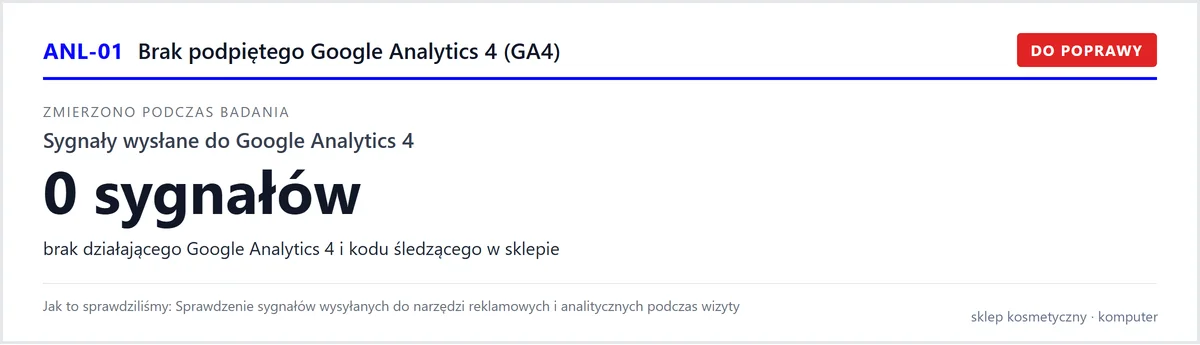
It sounds basic, yet live audits regularly catch two extremes. First (panel ANL-01 below): zero signals reaching Google Analytics 4 - commonly caused by a cookie plugin update that hard-blocked the entire container instead of firing cookieless Consent Mode v2 pings, or a theme deployment that dropped the tag snippet.
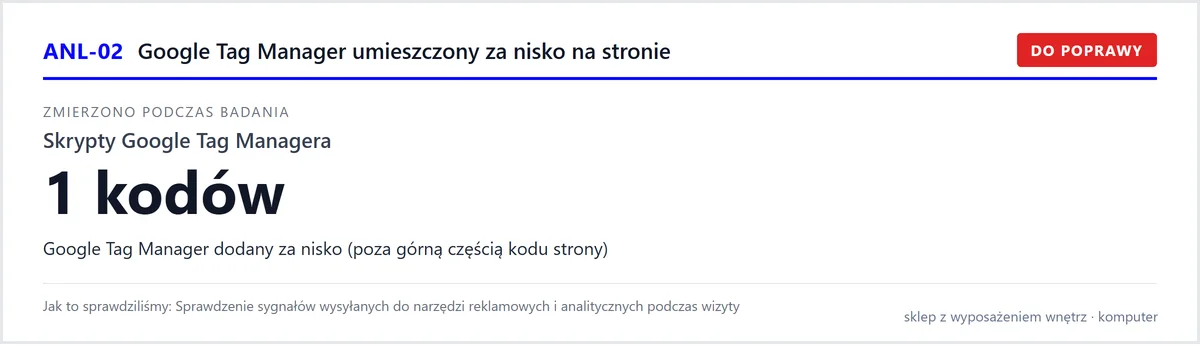
Second (panel ANL-02 in the next section): Google Tag Manager is installed, but injected too low in the HTML (near </body> instead of high in <head>). On fast office Wi-Fi nobody notices; on mobile cellular networks, ad clickers tap into a category or bounce before the browser reaches the footer, erasing entire segments of fast sessions.
- 1. Initialise
dataLayerand Consent Mode v2 default state (gtag('consent', 'default', ...)): at the very top of<head>before GTM loads. - 2. Load your CMP (cookie banner) script: include
wait_for_update: 500for returning visitors with stored preferences. - 3. Load GTM (
gtm.js): high inside<head>, with the<noscript>fallback immediately after the opening<body>tag.
GTM injected too low and GA4 loaded 6 times per visit
The opposite of zero tracking is “agency archaeology”: one vendor hardcoded gtag.js into the template, the store owner enabled the platform’s native GA4 integration, and another team added a Google Tag plus a manual page_view tag inside GTM.
Below is panel ANL-02 from an interior decor store (GTM placed outside the top of the document), followed in the next chapter by panel ANL-03 from an accessories store where GA4 code loaded 6 times and a single visit fired 4 page_view signals to the exact same Measurement ID. Bounce rate drops artificially near zero, session counts distort and conversion rates become unusable.
- Route all tags through GTM (or 100% through one clean integration): never run the platform’s built-in “GA4 ID” box alongside a GTM Google Tag.
- One Google Tag with automatic
page_view: do not attach a second manualpage_viewevent on All Pages unless you intentionally disabledsend_page_view. - Audit page source after every platform or agency handover: search raw HTML and DevTools Network for
G-,GTM-andgtag/js- exactly one clean pipeline should fire.
4 signals per page load and Consent Mode v2 missing its default state before GTM
Below is the live ANL-03 capture from the accessories store mentioned above (GA4 script loaded 6 times, firing 4 page-view signals on a single entry). Alongside duplication, the second most common tracking bug across European stores is half-wired Consent Mode v2.
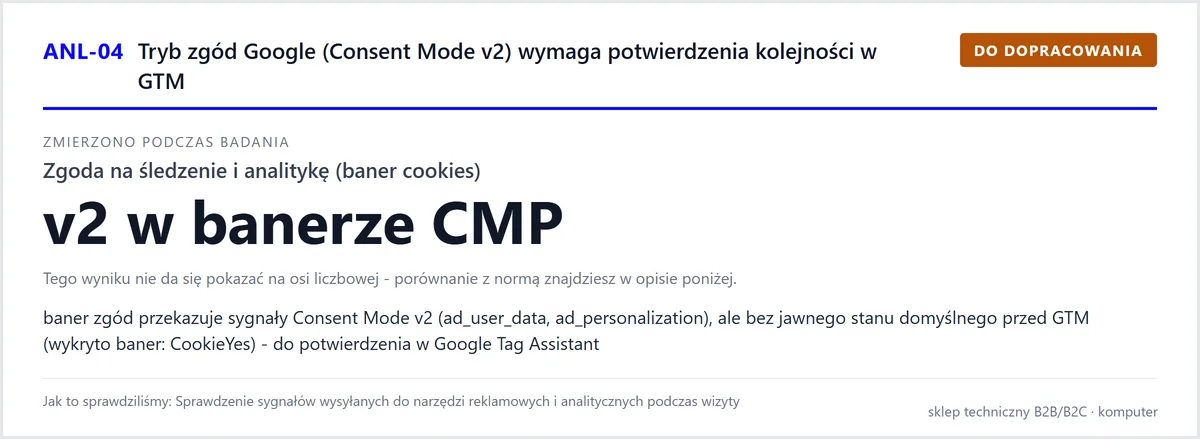
Store owners see a cookie banner (CookieYes, Cookiebot, ConsentManager) and assume compliance is done. Yet as measurement ANL-04 shows in the next section, the banner sends ad_user_data and ad_personalization parameters without declaring an explicit default state (consent default: denied) before GTM starts. Ad tags fire before consent rules initialise, breaking both GDPR expectations and Google Ads conversion modelling.
- Open Google Tag Assistant (tagassistant.google.com) in a fresh incognito window: confirm
Consent Initializationappears ABOVEContainer Loadedin the left timeline. - Inspect the “Consent” tab before clicking the banner: all four keys (
ad_storage,analytics_storage,ad_user_data,ad_personalization) must show Default =Denied. - Click “Accept all” and inspect the Update event: flags must flip to
Granted, and in DevTools Network thegcsparameter on/g/collectshould move fromG100toG111.

Consent Mode v2 firing order and a 30-minute tracking quality audit
Below is panel ANL-04 capturing the exact Consent Mode v2 ordering warning (banner present, missing explicit default state before GTM). Even if your analytics look fine on the surface, run this structured 30-minute audit once per quarter - and after every checkout or CMP update.
Treating tracking QA as a scheduled engineering routine prevents months of corrupted campaign reporting and silent drops in Google Ads / Meta Ads bidding accuracy.
- Minutes 0-5 (Tag Assistant + Network): verify 1 GTM container high in
<head>, 1page_viewper load and strictConsent Initialization→Container Loadedsequence. - Minutes 5-15 (End-to-end test in GA4 DebugView): walk through search → category → filter → variant → add to cart → checkout → test order in incognito. Confirm all 12 events fire once with complete
items[]payloads. - Minutes 15-25 (Reconcile GA4 against store backend): compare 30-day orders and revenue in GA4 against your ERP/store database (factoring in declined cookie consent and offline bank transfers).
- Minutes 25-30 (Rich Results Test): run one product URL through Google Rich Results Test to verify
Product,Offer(price, currency, availability) andAggregateRating.
Why we audit Product Schema.org alongside GA4 Data Layer
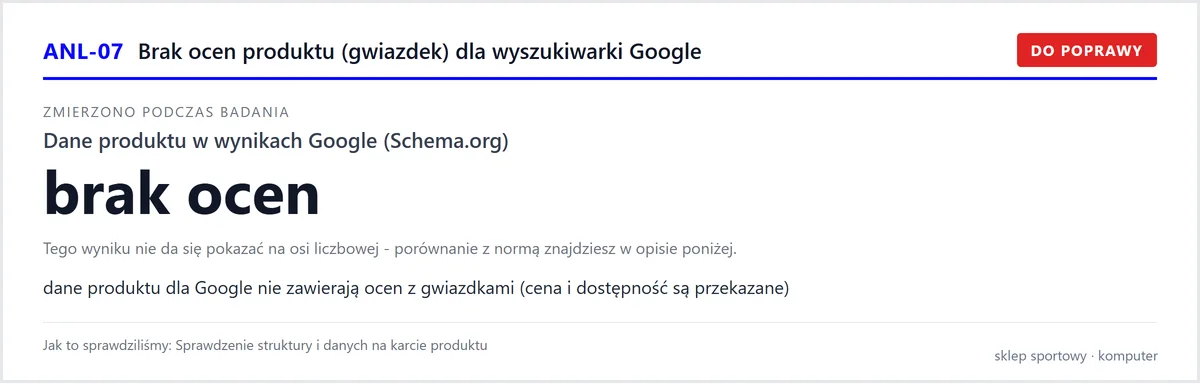
Whenever we implement a clean GA4 Data Layer, we audit the product page’s JSON-LD Product schema in the same pass. Both read the exact same database fields (SKU, name, variant, gross price, currency, stock, ratings). In audit panel ANL-07 below, the sports store sent valid price and stock markup to Google, yet omitted AggregateRating - even though the visible PDP showed a 4.9 star average.
Aligning your Data Layer, Product JSON-LD and Google Merchant Center feed ensures analytics, organic rich snippets, AI shopping assistants and Shopping Ads all read one consistent set of numbers.
name,sku,gtin(EAN) andbrand: matched toitem_idin GA4 and your Merchant Center product feed.offers: accurate gross price, ISO currency (EUR/PLN) and live stock state (InStock/OutOfStock).aggregateRating(conditional only): never output empty markup withratingCount: 0- emit it only once a product has genuine verified reviews.
Contact
Book a free 15-minute consultation.
Fill in the form. Dawid Śliwiński (Co-founder of PUSH) will analyse your store and get back to you within 24 hours with an actionable plan.

“Instead of hunting for random freelancers for every fix, we handed them full control over technology and campaigns. The store finally runs without issues, our customer acquisition costs dropped drastically, and we can focus solely on logistics and order fulfilment.”
Martyna - Co-owner, Rolexpress.pl