

Duplicate or Missing Transactions in GA4: Why Store Revenue Doesn't Match
50% of audited e-commerce stores double-count GA4 hits, while many others lose 30-50% of orders to Consent Mode v2 and gateway redirects. Debug and fix your tracking in 15 minutes.
A steady 5-15% shortfall in GA4 vs your store backend is normal for client-side tracking due to ad blockers and cookie refusals. If GA4 shows more revenue than your backend (dual plugin + GTM tags or Thank You Page reloads) or 30%+ less (Consent Mode v2 Basic, dropped gateway returns, malformed value), your tracking needs immediate repair.
What GA4 vs store backend discrepancy is normal, and when tracking is broken
Google Analytics 4 almost never matches your e-commerce backend or ERP to the cent. Browser ad blockers, Safari ITP, denied cookie banners (Consent Mode v2), and post-checkout cancellations create a natural gap. The danger begins when that gap widens beyond a healthy buffer or flips positive (GA4 reporting more orders than your bank account).
In our 2026 E-commerce CRO Audit Report (N = 18 stores), exactly 50.0% of audited stores (9 of 18) suffered from double-counted GA4 hits (rule ANL-03), and 83.3% had analytics or structured-data failures.
| GA4 vs Store Backend / ERP | Diagnostic status | Most likely root cause |
|---|---|---|
| GA4 5% to 15% below backend (stable trend) | NORMAL CLIENT-SIDE | Expected loss from ad blockers, Safari ITP, and unconsented sessions (reducible via Server-Side GTM). |
| GA4 30% to 60%+ below backend | ALERT · DATA LOSS | Consent Mode v2 Basic blocking tags, CMP misconfiguration, dropped gateway returns, or broken dataLayer. |
| GA4 higher than backend (+5% to +100%) | ALERT · DUPLICATION | Dual GA4 installation (native plugin + GTM), Thank You Page reloads, or missing transaction_id deduplication. |
Discrepancy scale: GA4 vs store backend orders
4 most common causes of duplicate transactions and pageviews in GA4
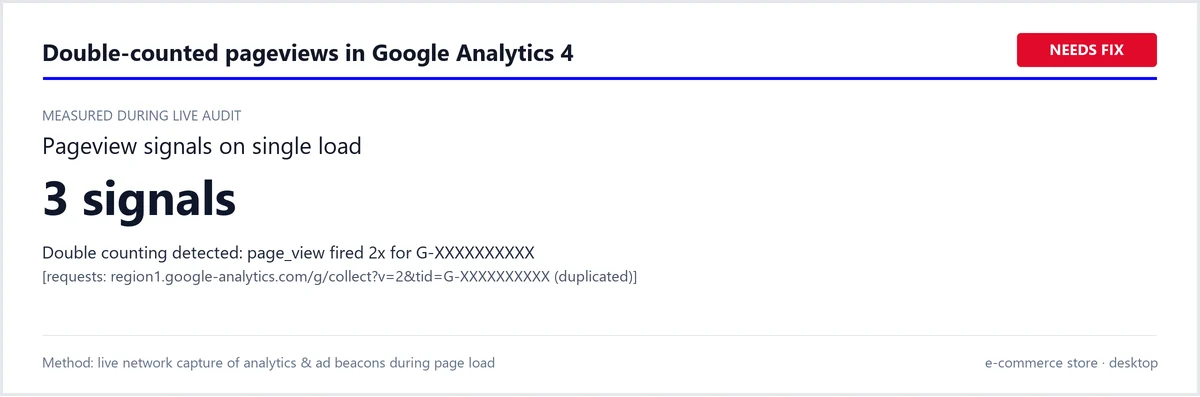
purchase and page_view hits originate:- Native plugin + manual GTM tag firing together: the #1 bug on WooCommerce, PrestaShop, and SaaS platforms. Both the store's native GA4 integration and a GTM container fire the same
G-XXXXXXXXXXmeasurement ID. - Thank You Page reloads: a shopper reopens their mobile browser tab hours later, triggering a fresh page load that pushes
purchaseintodataLayera second time because the backend never flagged the order as already tracked. - Payment gateway return loops: external gateways fire order confirmation once on submission and a second time after asynchronous payment confirmation redirects back to the store.
- Inconsistent
transaction_idformatting: GA4 only deduplicates identical IDs within the same session. Sending10452from one script and#10452from another, or reloading the page the next day, records two separate orders.
Live audit proof: duplicate GA4 hits fired on a single page load
4 most common causes of missing transactions in GA4
1. Consent Mode v2 Basic mode or wrong CMP load order
When a CMP blocks Google tags completely until consent is granted (Basic mode) or fires default consent signals after the GA4 config tag, GA4 loses both direct conversion events and behavioral modeling eligibility.
2. Buyers closing the tab on external payment gateways
Shoppers paying via mobile bank apps frequently close the tab as soon as the bank confirms payment, never returning to the store's Thank You Page. Server-side purchase dispatch (Server-Side GTM / Measurement Protocol tied to payment webhooks) or on-site payment flows close this gap.
3. Malformed currency, string prices, or empty items array
Passing value as a localized string with a comma ("249,90" instead of numeric 249.90) or omitting currency lets the request return HTTP 204 while silently dropping revenue from e-commerce reports.
4. Platform-specific pitfalls (Shopify Web Pixels, WooCommerce cache)
On Shopify, legacy Thank You Page scripts broke after checkout.liquid deprecation and must run via Web Pixels. On WooCommerce, aggressive page caching of /order-received/ or JS minifiers often break GTM4WP payloads. See our GA4 + GTM Data Layer Tracking Plan and Why GA4 Misreports ROAS.
Where purchase events get lost on the way to GA4
Consent Mode Basic
Declined consent blocks GA4 completely, preventing even cookieless pings for conversion modeling.
Closed mobile tab
Buyer confirms payment in their banking app and closes the browser before returning to Thank You page.
Invalid payload types
Missing currency, formatted string instead of float value, or empty items[] array.
Dedup + Server-Side
Single tag source, unique transaction_id, and server-side purchase dispatch on payment webhook.
15-minute debugging checklist (Tag Assistant, DebugView & Network)
- Count
collect?v=2hits in DevTools Network: if one page load sends twoen=page_viewrequests to the sametid=G-..., remove the duplicate plugin or GTM tag. - Inspect
gcsandgcdconsent parameters: verify they update cleanly before and after accepting cookies in your CMP. - Check
purchasein GA4 DebugView: verify uniquetransaction_id, numeric dot-decimalvalue, validcurrency, and populateditems. - Press F5 on the Thank You Page: confirm
en=purchasedoes NOT fire a second time. If it does, add server-side order meta flags or GTM deduplication. - Reconcile 30 days of
transaction_idexports: cross-join GA4 against your backend to isolate exact duplicate IDs and payment methods with the highest drop rate. - Audit Referral Exclusions: ensure Stripe, PayPal, Adyen, PayU, Klarna, and local gateway domains are excluded so they cannot steal attribution from paid ads.
Run a self-check in our free GA4 Configuration Audit Tool or book a full fix under E-commerce Analytics GA4 & GTM.
PUSH-CRO Scanner
Check your store in 2 minutes for mobile UX blockers, PDP trust gaps, WCAG issues, and GA4 configuration errors.
Store Diagnosis + 1h 1:1 Call
Manual mobile and desktop journey review, a 15+ page PDF report with annotated screenshots, and a 1-hour live call.
Full UX/CRO & GA4 Audit
Start (€890), Architecture & CRO (€2,100), or 360° Audit (€3,950) with developer-ready specs and QA verification.
Contact
Book a free 15-minute consultation.
Fill in the form. Dawid Śliwiński (Co-founder of PUSH) will analyse your store and get back to you within 24 hours with an actionable plan.

What you get within 24 hours
- An initial store review by Dawid Śliwiński (no sales reps).
- 2-3 concrete conversion blockers spotted on your live purchase journey.
- A tailored next-step recommendation matched to your store's scale (audit, fixed sprint or retainer).