

High Traffic, No Sales in Your Online Store: 7-Step CRO Diagnosis
Getting clicks from Google Ads, Meta, or SEO while orders stay flat? Before increasing ad spend or redesigning your theme, use this 7-step framework grounded in real e-commerce audit data.
High traffic with low sales comes down to three buckets: broken GA4 tracking (ad algorithms stop seeing conversions), misaligned paid traffic intent, or mobile PDP and checkout friction. Start by reconciling backend orders against GA4, split add_to_cart by mobile vs desktop, and place a live incognito test order on your phone.
How to separate GA4 tracking bugs, bad ad traffic, and on-site leaks
When an online store gets steady clicks from Google Ads, Meta Ads, or organic search without turning them into orders, teams usually make one of two expensive mistakes: raising ad bids or commissioning a full visual redesign. Neither works until you isolate which of three distinct failure modes is causing the flatline.
Where to start? 3 fast checks before changing your store
- Did real revenue drop, or did tracking break? Compare paid orders in your store backend (Shopify, WooCommerce, PrestaShop, Shoper, IdoSell) against
purchaseevents in GA4 over the last 14 days. In our 2026 E-commerce CRO Audit Report (N = 18 stores), 83.3% had analytics or schema defects. When GA4 drops transactions, Smart Bidding optimizes for non-buyers. - Is ad intent aligned with the landing page? Segment
add_to_cart / view_itemby traffic source and device. If brand and direct visitors add products normally while PMax or social clicks bounce in 8 seconds, fix query exclusions, landing URLs, and offer alignment first. - Is mobile collapsing while desktop converts? When desktop converts reliably but smartphones (often the majority of sessions) barely produce orders, your product and pricing are not the root cause. Mobile ergonomics, speed, or checkout friction are blocking buyers.
Before touching campaigns, verify unit economics in our Break-Even ROAS & Margin Calculator. Sometimes the store is not missing clicks, it simply lacks enough margin to absorb rising CPC at its current conversion rate.
The 7-step store diagnosis tree (from first click to payment)
Across N = 18 anonymised stores audited with the PUSH-CRO engine (averaging 18.9 confirmed fails per store), revenue leaks rarely sit in a single widget. They stack across seven predictable friction stages.
Where do stores leak the most sales? Confirmed fails by stage
Step 1. Above-the-fold load speed and overlays
If ad visitors wait on slow LCP or get hit by a cookie wall stacked with a discount popup before seeing the product, sessions end before the first scroll. In our audit dataset, 33.3% of stores exceeded 2,500 ms mobile LCP and 27.8% failed CLS above 0.10. See our breakdown in Core Web Vitals in E-commerce (LCP, CLS, TTFB).
Step 2. Category listings, search, and filters
Shoppers landing on a category page who cannot filter by size, availability, or key specs bounce back to Google. Hiding out-of-stock status on product tiles forces wasted clicks and kills buying momentum. Read E-commerce Search and Filters UX Errors for concrete fixes.
Step 3. Product Page (PDP) - the #1 leak stage
46.5% of all confirmed failures in our audit sample occurred on the product page. 66.7% pushed Add-to-Cart below the first mobile screen, 66.7% lacked a sticky mobile buy bar, 55.6% hid return terms near the CTA, and 55.6% showed zero payment badges on the PDP. See 6 Real Product Page CRO Errors.
Step 4. Hidden shipping cost and delivery timing
Shoppers want two facts before adding to cart: exact delivery cost and realistic dispatch timing. Revealing shipping fees only at step three of checkout turns your cart into a shipping calculator that buyers immediately abandon.
Step 5. First-visit trust and legal transparency
Paid acquisition brings cold audiences who have never heard of your brand. In our dataset, 72.2% omitted full company legal details (VAT ID and address) in the footer, and over half lacked visible product reviews on the PDP. See Anatomy of Trust in E-commerce.
Step 6. Cart and checkout blockers
88.9% of audited stores triggered cart or checkout fails, including missing email autocomplete on mobile, mandatory phone fields, distracting store navigation inside checkout, and forced account creation. Explore all fixes in Abandoned Cart: 6 Real Checkout Blockers.
Real mobile audit examples: why smartphone visitors leave without buying
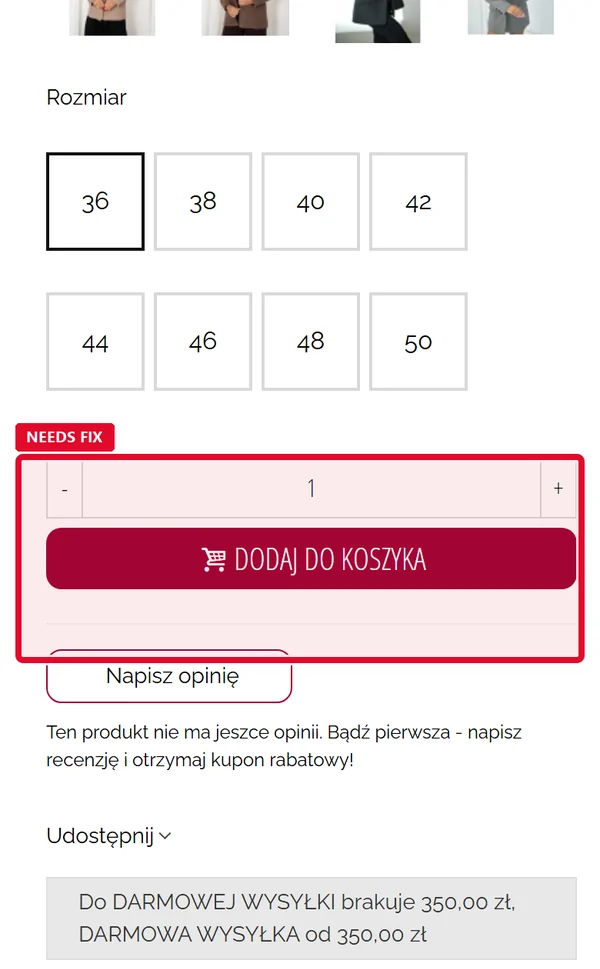
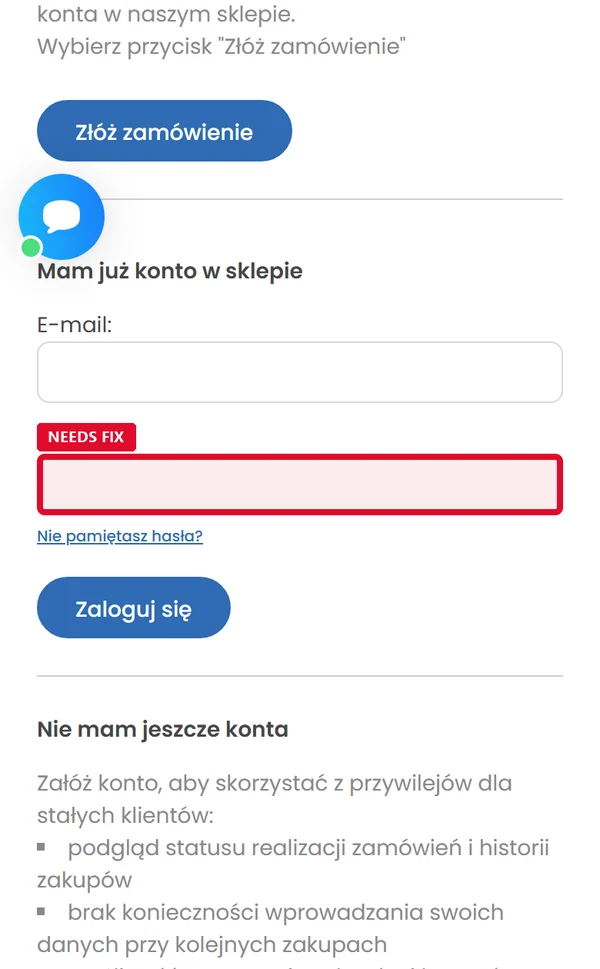
Step 7. Mobile thumb ergonomics and technical regressions
100.0% of audited stores (18 out of 18) had mobile tap targets smaller than 44 x 44 px, and 83.3% triggered WCAG 2.1 / EAA accessibility issues such as low contrast or chat widgets covering buttons. Complete a real incognito purchase on both iOS and Android before assuming checkout works.
Diagnostic matrix: GA4 & Ads symptoms mapped to your first fix
| Symptom in GA4 / Ads | Most likely root cause | First diagnostic action |
|---|---|---|
| High bounce / session < 15s from paid clicks | Slow mobile LCP, mismatch between ad promise and PDP, or intrusive cookie/discount overlays. | Test the landing URL in PSI mobile and watch 15 paid sessions in Microsoft Clarity. |
Strong PDP views, flat add_to_cart |
Out-of-stock variants, hidden shipping cost, missing specs or social proof near the buy button. | Run our Product Page Audit tool and split add_to_cart by mobile vs desktop. |
Healthy add_to_cart, drop at begin_checkout |
Surprise shipping fees in cart, forced registration, or a prominent promo code box driving shoppers off-site. | Check your cart in our Cart & Checkout Audit tool and surface shipping terms on PDP. |
High begin_checkout, weak purchase |
Mobile form validation bugs, missing express wallets (Apple Pay / Google Pay / local rails), or gateway errors. | Run a live mobile test order and review our payment & delivery CRO guide. |
| Backend orders look fine, GA4 shows a drop | Consent Mode v2 Basic blocking tags, broken gateway redirects, or duplicate/conflicting GTM tags. | Follow our GA4 duplicate & missing transactions guide. |
Mobile product page: typical ad leak vs conversion-ready layout
- 1Sticky header + promo strip eat 20% of the mobile viewport.
- 2No shipping cost, dispatch time, or ratings near the price.
- 3Add-to-Cart pushed below the fold and blocked by chat.
- 1One compact 56 px header leaves room for the product offer.
- 2Price, ratings, buy button, and shipping terms fit above the fold.
- 3A bottom sticky CTA bar stays within thumb reach during scroll.
Quantify the leak and fix blockers in the right sequence
Work in four strict waves: fix GA4 measurement and broken mobile interactions first, rebuild product page clarity second, remove checkout and payment friction third, and scale paid acquisition last. Use our Lost Revenue Calculator to estimate how much monthly revenue even a 0.3 to 0.5 percentage point lift unlocks, or walk through the full 8-Area CRO Audit Checklist.
Fix order that protects your ad budget
GA4 tracking
Verify add_to_cart, begin_checkout, purchase, and Consent Mode v2.
Mobile PDP
Move CTA above the fold, add sticky buy bar, shipping cost, and ratings near price.
Cart & checkout
Remove login walls, cap required fields at 8, enable Apple Pay and Google Pay.
Scale Ads
Only raise PMax and Meta budgets once the funnel converts and GA4 sees real orders.
PUSH-CRO Scanner
Check your store in 2 minutes for mobile UX blockers, PDP trust gaps, WCAG issues, and GA4 configuration errors.
Store Diagnosis + 1h 1:1 Call
Manual mobile and desktop journey review, a 15+ page PDF report with annotated screenshots, and a 1-hour live call.
Full UX/CRO & GA4 Audit
Start (€890), Architecture & CRO (€2,100), or 360° Audit (€3,950) with developer-ready specs and QA verification.
Contact
Book a free 15-minute consultation.
Fill in the form. Dawid Śliwiński (Co-founder of PUSH) will analyse your store and get back to you within 24 hours with an actionable plan.

What you get within 24 hours
- An initial store review by Dawid Śliwiński (no sales reps).
- 2-3 concrete conversion blockers spotted on your live purchase journey.
- A tailored next-step recommendation matched to your store's scale (audit, fixed sprint or retainer).